You just decided to play Dungeons & Dragons. You’ve picked a race, you’re eyeing a class, and then — bam — the character sheet stares back at you with six empty boxes labeled STR, DEX, CON, INT, WIS, CHA.
What numbers go here? How do I even calculate these? Is there a calculator for this?
Yes. There absolutely is. And you’re in the right place.
This guide answers the most Googled question new (and returning) D&D players ask: what is the best calculator to use for statistics in D&D 5e? We’ll break down every method, review the top online tools, and help you build a character whose numbers actually match your vision — not just whatever the dice felt like giving you on a Tuesday night.
Let’s roll.
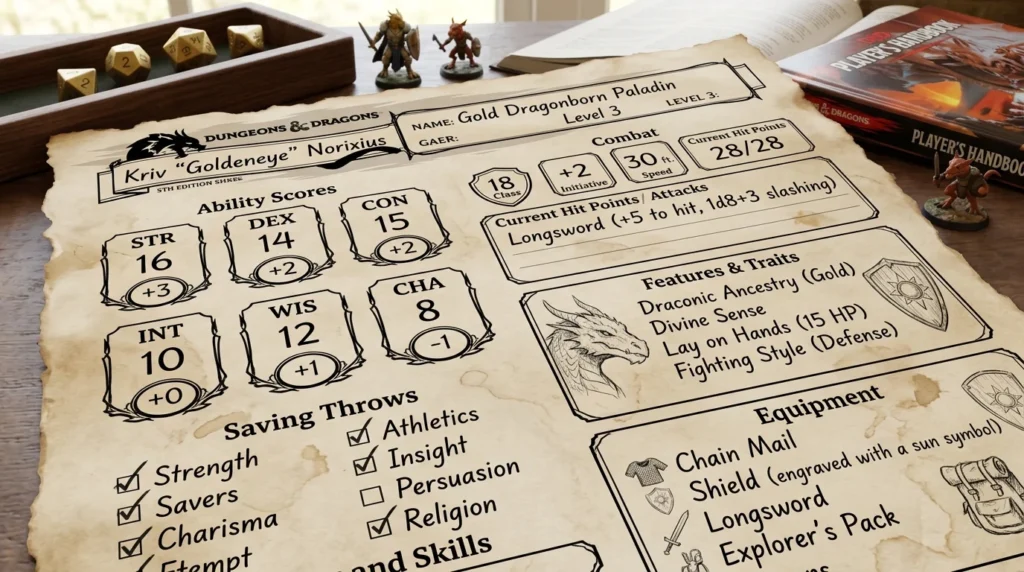
Why Statistics Matter So Much in D&D 5e
Before we talk calculators, let’s talk stakes. In D&D 5e, your six ability scores aren’t just numbers — they’re the engine beneath every decision your character makes.
- Strength determines how hard you hit and whether you can shove a troll off a bridge.
- Dexterity controls your reflexes, stealth, and ranged attacks.
- Constitution is what keeps you alive when your DM rolls a critical hit at the worst possible moment.
- Intelligence powers your wizard’s spellcasting and your rogue’s Arcana checks.
- Wisdom keeps your Cleric healing and your Ranger tracking.
- Charisma is what separates a Bard who talks their way into the palace from one who starts a diplomatic incident.
Every ability score also generates a modifier — the number you actually add to most dice rolls. The formula is simple: subtract 10 from the score, divide by 2, and round down. So a score of 16 gives you a +3 modifier. A score of 8 gives you a -1.
Those modifiers compound over a campaign. A +1 difference in your primary stat can mean the difference between hitting that dragon or missing it entirely — potentially ending an entire session. Getting your stats right at character creation isn’t just optimal play. It’s responsible storytelling.
The Three Main Methods for Generating D&D Stats
The Player’s Handbook gives you three official methods for assigning ability scores. Each has a calculator built for it.
1. Standard Array
You get six pre-set scores: 15, 14, 13, 12, 10, 8. Assign them to whichever abilities fit your class. No randomness, completely balanced.
Best for: New players, balanced parties, campaigns where the DM wants fairness across the table.
2. Point Buy
You start with all six scores at 8 and have 27 points to spend. Each point raises a score by 1, but scores cost more above 13 (14 costs 2 points, 15 costs 2 points). Maximum you can buy is 15 in any single score.
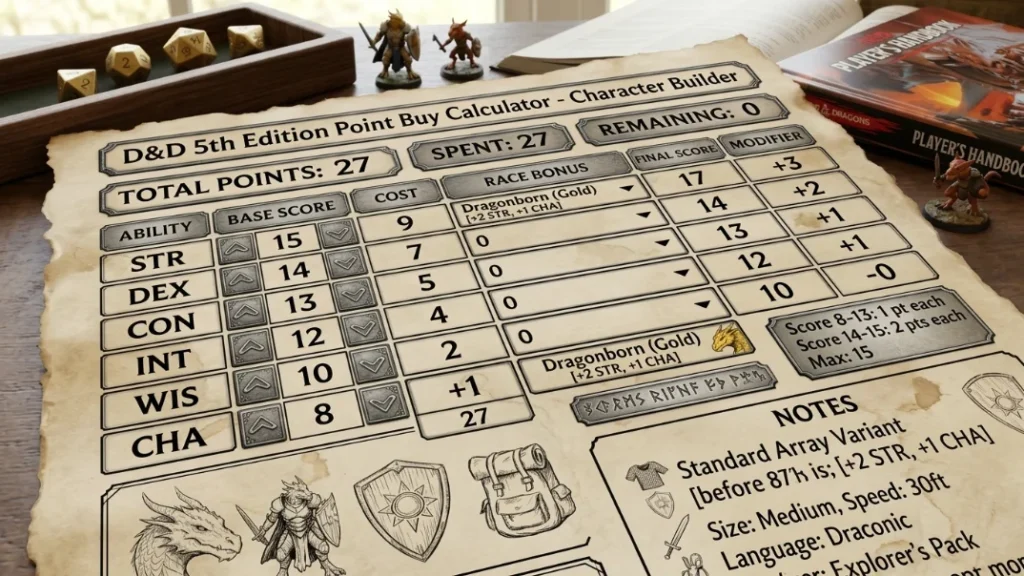
Best for: Optimizers, min-maxers, players who want full control over their build.
3. Dice Rolling (4d6 Drop Lowest)
Roll four six-sided dice, drop the lowest result, and sum the remaining three. Repeat six times. Assign as desired.
Best for: Old-school players, high-risk tables, anyone who loves a dramatic origin story or the chaos of a 5/5/4/3/3/2 spread.

What Makes a Great D&D Statistics Calculator?
Not all stat calculators are created equal. Here’s what separates a genuinely useful tool from a glorified adding machine:
Accuracy — It must apply the correct PHB rules. No rounding errors, no off-by-one modifier calculations.
All three generation methods — The best tools handle Standard Array, Point Buy, and Dice Rolling in one place.
Modifier display — It shows your modifier alongside the raw score automatically. No manual math.
Race/species bonuses — 5e 2014 rules apply racial stat bonuses. The calculator should account for these.
Mobile-friendly — Half your players are at the table on a phone. The tool needs to work there.
No login required — Character creation is impulsive. A calculator that demands an account loses users immediately.
Speed — It should update in real time as you adjust scores.
The Best Free D&D Stat Calculators Online (Ranked & Reviewed)
🥇 1. DnD Stat Calculator (dndstatcalculator.online)
The verdict: Best all-around free calculator for D&D 5e statistics.
This is the tool built specifically for the question you’re asking. DnD Stat Calculator offers a clean, fast interface that handles all three generation methods and automatically displays your ability modifiers as you build. There’s no account wall, no paywalled features, and no bloat — just the numbers you need, presented clearly.
What sets it apart is the combination of speed and clarity. The modifier auto-calculates the instant you adjust a score. The point buy system enforces PHB caps and costs correctly. The layout is designed for actual play, not for showing off design awards.
For players who want to understand their stats — not just copy-paste a build from Reddit — this is the calculator to bookmark.
Best for: All players. New players especially benefit from the clean UX.
🥈 2. DnDBeyond Character Builder
DnDBeyond’s character builder is the most feature-rich option available, and it includes stat generation as part of a full character creation flow. It supports all three methods, applies racial bonuses, and feeds your stats into a complete character sheet.
The catch: it’s a full character builder, not a quick calculator. If you just want to crunch some ability scores without committing to an entire character, the experience feels like ordering a full meal when you wanted a snack.
Best for: Players building complete characters who want everything in one ecosystem.
🥉 3. Roll20 Character Sheet
If your table plays on Roll20, the integrated character sheet includes a stat block with modifier calculation built in. It’s not designed as a standalone calculator, but it’s perfectly functional if you’re already in the platform.
Best for: Roll20 users who want to stay in-platform.
Honorable Mention: Dice rolling apps (D&D Dice, RPG Simple Dice)
For the dice rolling method specifically, standalone dice apps like RPG Simple Dice let you simulate the 4d6-drop-lowest method on your phone. They don’t calculate modifiers or help you assign scores, but they handle the rolling half of the equation cleanly.
Best for: Tables using the dice method who want physical-feel randomness on a screen.
Head-to-Head: Point Buy vs. Standard Array vs. Dice Roller
| Method | Fairness | Customization | Risk | Best For |
|---|---|---|---|---|
| Standard Array | ★★★★★ | ★★★☆☆ | None | New players |
| Point Buy | ★★★★★ | ★★★★★ | None | Optimizers |
| Dice Rolling | ★★☆☆☆ | ★★★☆☆ | High | Old-school fans |
The honest take:
Point Buy wins for optimization. Standard Array wins for table fairness. Dice rolling wins for stories — because the Barbarian who rolled three 6s and became a demigod is legendary at that table for years.
If you’re new, start with Standard Array. If you know your class well, use Point Buy. If your entire friend group has been playing since 2003 and refuses to change, embrace the dice.
Pro Tips for Using a D&D Stat Calculator Like a Veteran
1. Start with your class’s primary stat, not your highest score. What’s your primary stat? That’s where your 15 or 16 goes. Always. A Fighter needs STR or DEX. A Wizard needs INT. A Cleric needs WIS. Don’t put your highest score in CHA because you want to be charming — put it where your class demands it.
2. Never dump CON below 10. Constitution saves affect concentration spells, death saves, and hit points. Every class benefits from at least a neutral CON. Dumping it to 6 is a choice you’ll regret in session 3 when your Wizard gets smacked by a goblin and drops their Hold Person.
3. Understand the modifier breakpoints. Modifiers only change at even scores: 8 and 9 both give -1. 10 and 11 both give +0. 12 and 13 both give +1. In Point Buy, buying from 13 to 14 costs 2 points for the same +1 gain you’d get from 11 to 12 for 1 point. Spend accordingly.
4. Check your class’s saving throw proficiencies. Your class gives you proficiency in two saving throw types. If you have proficiency in WIS saves, your WIS score matters more defensively — worth keeping it at least neutral.
5. Plan your Ability Score Improvements (ASIs) at level 4. You’ll get ASIs at level 4 (and beyond). If your primary stat is 15 in Point Buy, you’re one ASI away from 16 (and another from 17 to 18). Plan for this. A 15 going to 16 at level 4 is a clean path. A 14 going to 15 wastes the ASI (no modifier gain).
Which Class Benefits Most from Optimized Stats?
Some classes are more stat-hungry than others. Here’s a quick breakdown:
Most stat-dependent:
- Paladin — Needs STR (or DEX for Dex-paladin), CHA for spellcasting and auras, and decent CON. Three-stat dependency is brutal.
- Ranger — DEX or STR plus WIS for spellcasting. Two-stat minimum.
- Monk — DEX and WIS both matter heavily. Needs to be calculated carefully.
More forgiving:
- Barbarian — STR and CON. Two stats, clear priority.
- Rogue — DEX primary. Everything else is secondary.
- Fighter (Champion) — STR or DEX. Straightforward.
If you’re playing a Paladin or Monk, use a stat calculator in Point Buy mode and spend every point deliberately. These classes have less room for error than a Champion Fighter who just needs the biggest number in STR.
Common Stat Calculation Mistakes (and How to Avoid Them)
Mistake #1: Calculating modifiers wrong. The formula is (score − 10) ÷ 2, rounded down. A 9 gives -1, not 0. Use a calculator that shows modifiers automatically to avoid this entirely.
Mistake #2: Applying racial bonuses to the wrong score. In 5e 2014, racial bonuses are fixed (e.g., Hill Dwarf gets +2 CON, +1 WIS). Some players forget to add these after assigning their base scores. Your base 15 STR becomes 15 — then your racial bonus applies on top. Calculate base first, add racial after.
Mistake #3: Ignoring the 15-cap in Point Buy. In Point Buy, you cannot exceed 15 in any score before racial bonuses. Players sometimes try to buy to 16 and wonder why their calculator won’t allow it. The PHB cap is 15 base. Racial bonuses can push it to 17.
Mistake #4: Dumping WIS on a non-Rogue. WIS affects Perception (the most-rolled skill in the game), Insight, and many saving throws. Dropping it to 8 saves you 2 points in Point Buy but costs you Perception for an entire campaign.
Mistake #5: Using a random online dice roller that doesn’t follow 4d6-drop-lowest. The correct dice rolling method uses four dice and drops the lowest single die, not the lowest total. Some apps roll 3d6 by default. Always verify the rolling method before accepting your scores.
FAQ
Q: What is the best calculator to use for statistics in D&D 5e?
A: For a fast, accurate, free tool, DnD Stat Calculator (dndstatcalculator.online) is the top choice. It handles all three generation methods, auto-calculates modifiers, and works on mobile without requiring an account.
Q: Is Point Buy better than Standard Array?
A: For optimization, yes. Point Buy gives you full control and is preferred by players who know their build. Standard Array is faster and guarantees fairness across a party.
Q: Can I use the dice rolling method in an online calculator?
A: Yes. Several tools — including dice rolling apps and some character builders — simulate 4d6-drop-lowest digitally.
Q: What’s the maximum stat you can have at character creation in 5e?
A: 20 is the standard cap for players, though some racial combinations can push to 17 at level 1 via Point Buy + racial bonus. The absolute cap from ability scores alone at character creation is typically 20, though certain features can eventually increase it.
Q: Do modifiers matter more than the raw score? A: In practice, yes. The modifier is what you add to rolls. Raw scores only matter at the thresholds where modifiers change (even numbers). Always think in terms of modifiers when planning your build.
Q: Does the type of calculator matter for experienced players?
A: Experienced players often do point buy math in their heads, but a calculator is still useful for confirming modifier values and ensuring you haven’t exceeded Point Buy budget — especially for Paladin or Monk builds where multiple stats matter.
Conclusion — Your Stats, Your Story
There’s no shortage of tools that can help you answer the question of what is the best calculator to use for statistics — but the best one is the one that gets out of your way and lets you focus on building your character.
For D&D 5e, that means:
- Quick, accurate modifier display the moment you assign a score
- All three methods supported — Standard Array, Point Buy, and dice rolling
- No friction — no account, no paywall, no loading screen between you and your character sheet
Whether you’re a first-time adventurer trying to understand what CON even does, or a veteran optimizer min-maxing your fifth Paladin build, a great stat calculator saves you time, prevents errors, and keeps your focus where it belongs: on the game.
Start your stats at dndstatcalculator.online and get your character ready for whatever your DM has planned.
May your rolls be high and your DM merciful.


